
For phones, appliances and anything under warranty, *how many* isn't enough. You need to know which one. Track each unit by its IMEI or serial and you can answer, months later, whether a particular handset came from you, when, and who bought it.
Turn on serial tracking
In Product Catalog, select the item, click Edit item and tick Each unit has an IMEI / serial. Set Warranty (months) at the same time if the item carries one. Turning serials on also turns on stock tracking, because you can't identify units of something you aren't counting.
Record serials as they arrive
- 1Open Inventory → Stock.
- 2Find the item and click Add serials on its row. On a phone, tap ⋯ on the row first.
- 3Scan or type up to 500 serials per save, one per line or separated by commas. Each serial can be up to 120 characters. Scanning straight into the box works.
- 4Click Add serials.
Sell a specific unit
On an invoice, a line for a serial-tracked item has an extra IMEI / serial numbers field: in the line's ⋯ options on a computer, or when you tap the line on a phone. Enter the serials being handed over, separated by commas. On issue, matching units recorded as In stock for that product are marked sold and linked to the invoice. Check any warning for an unrecorded or unavailable serial.
Look up a unit
This is the reason the whole feature exists. On the Stock tab, type or scan a serial into Find an IMEI / serial and click Find. You get:
- Which item it is, and its status: In stock, Sold, Returned or Written off.
- Warranty on a sold unit: covered until when and how many days are left, or when it expired.
- Sold to: the customer, with the invoice number and date.
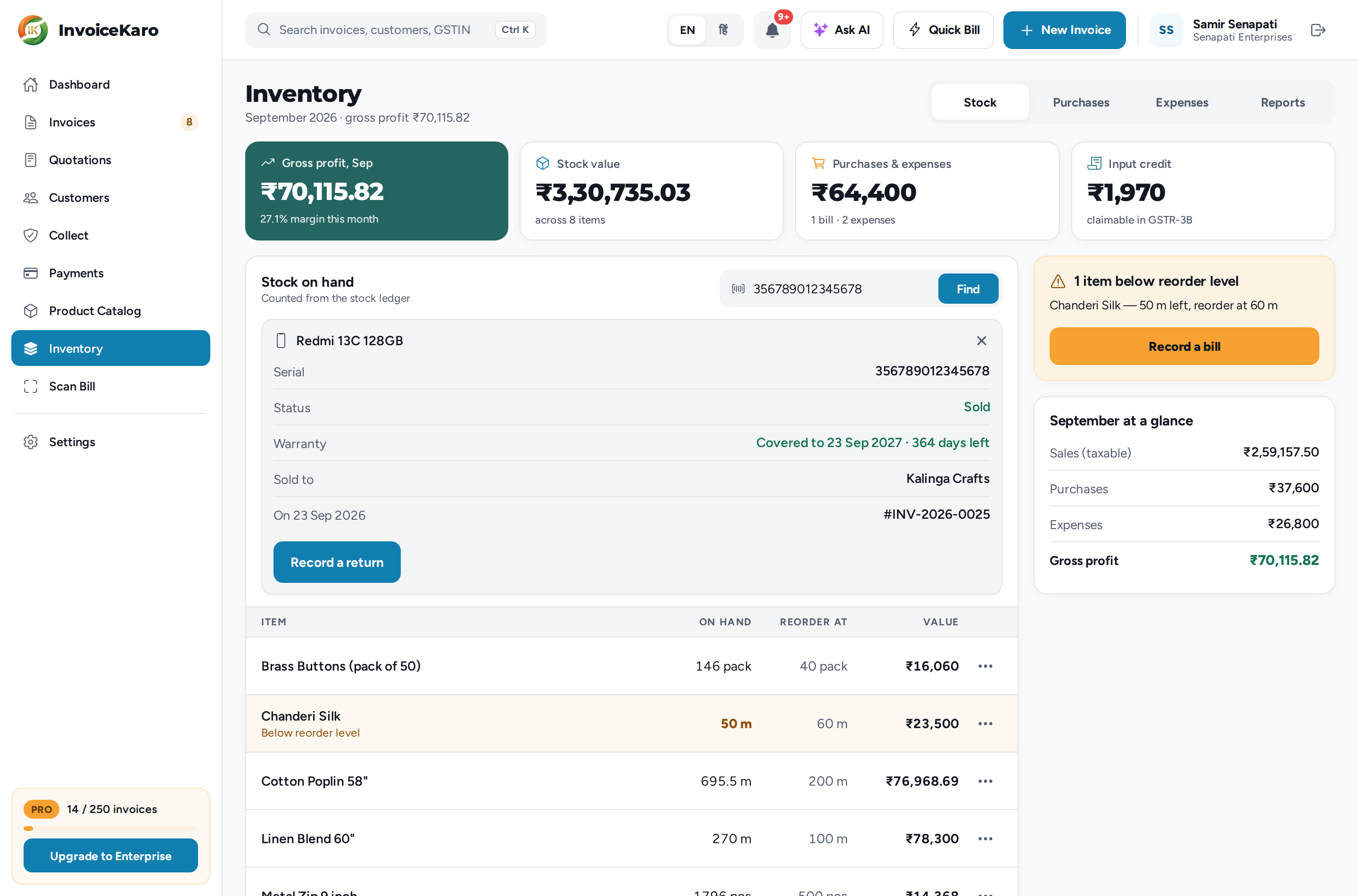
How warranty is counted
The app's warranty estimate uses the recorded sale date and the warranty months saved for the item. Months are calendar months, so twelve months from 15 March is 15 March the following year. Check the supplier or manufacturer's actual terms before deciding a warranty claim.
Handle a return
Look the unit up, then click Record a return. The sheet says whether it's still under warranty. Enter why it came back (required) and the Refund given (₹), leaving it at 0 for a straight swap. Tick Put it back on the shelf if it can be sold again, then click Record a return.
| Choice | What happens |
|---|---|
| Put it back on the shelf ticked | The unit becomes sellable again and the count goes back up. |
| Left unticked (faulty) | The unit is recorded as returned but stays out of your sellable count. |